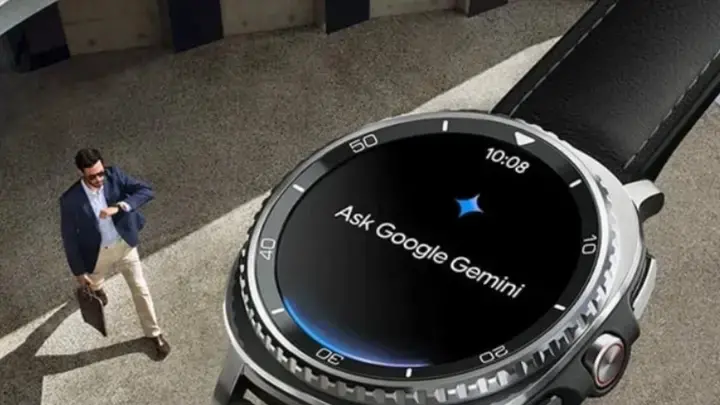

Google has officially expanded Gemini AI to Wear OS smartwatches, transforming the way users interact with their wearable devices. Whether you're using a Pixel Watch, Samsung Galaxy Watch, or OnePlus Watch, Gemini introduces a new generation of intelligence far beyond traditional voice commands.
👓 Design & Interface Experience
While Gemini is software, not hardware, it introduces noticeable improvements to smartwatch interaction:
-
🌙 Minimalist, cleaner UI
-
🎛️ Faster card navigation
-
🎙️ New voice UI with smoother animations
-
📲 Better on-screen prompts and suggestion bubbles
-
⚡ Reduced steps to complete tasks
Gemini brings a more fluid, modern feel to Wear OS — making the watch feel more like a mini-assistant than a notification screen.
📱 Smartwatch System Specs (Wear OS Integration)
These are the technical capabilities unlocked when Gemini runs on Wear OS 4+ :
-
⚙️ Wear OS 4 / 5 / 6 compatibility
-
💾 Access to Google services (Gmail, Calendar, Maps, Keep)
-
🌐 Connectivity over Bluetooth, Wi-Fi, LTE (for LTE watches)
-
🔊 Full mic + speaker support
-
🔐 On-device security + encrypted account access
Gemini turns these system capabilities into advanced AI-powered functions.
🚀 Performance & Processing Power
While the exact chip varies by watch, Gemini enhances performance via:
-
🧠 Cloud-processed AI models
-
⚡ Faster command interpretation
-
🪄 Predictive suggestions based on user habits
-
🔄 Contextual follow-up questions
This makes Gemini feel significantly smarter and quicker than the old Google Assistant.
🔊 Audio & Connectivity Features
-
🎤 Improved voice recognition
-
📶 Stable handling of “Hey Google” hotword
-
🗣️ Clearer responses through the watch speaker
-
📡 Smooth switching between phone–watch connection
Even in noisy environments, Gemini’s mic processing is noticeably more accurate.
🧠 AI Capabilities & Smart Features
Gemini’s major upgrades include:
⭐ 1. Smarter Than Traditional Voice Commands
Unlike basic commands, Gemini can now:
-
✉️ Summarize your latest email
-
🎵 Create playlists automatically
-
🚗 Tell you where you parked
-
📋 Draft notes and reminders
-
📅 Manage calendar conflicts
-
🔍 Interpret multi-step requests
It understands intent — not just keywords.
⭐ 2. Do More With Fewer Steps
You can now perform complex tasks during workouts, driving, or meetings:
-
🏃♂️ Dictate a message while running
-
🗓️ Schedule events instantly
-
🧭 Ask for directions hands-free
-
🎙️ Send a voice note without opening apps
Activation methods include:
👉 “Hey Google”
👉 Long-press side button
👉 Tap the Gemini icon
👉 “Raise to Talk” (select watches)
⭐ 3. Deep Integration with Google Apps
Gemini can access your Google account to deliver contextual AI:
-
💌 Read important emails
-
📅 Check for schedule conflicts
-
🔍 Look up locations mentioned in messages
-
✍️ Write quick responses
-
🧠 Auto-plan your day
With Wear OS 6, the new App Functions API lets Gemini interact with brand-specific apps like:
-
Samsung Health
-
Google Recorder
-
Weather
-
Pixel-exclusive features
⭐ 4. Small but Practical Features
Gemini adds everyday convenience:
-
🔐 Remember locker numbers
-
☕ Recall your usual coffee order
-
🕶️ Help you find misplaced sunglasses
-
📍 Location-based reminders (e.g., “Buy groceries when leaving work”)
-
❤️ Trigger supported fitness and health apps
It also integrates smoothly with Google Home:
-
💡 Control lights
-
🔒 Check door locks
-
🎙️ Broadcast messages
-
📺 Manage smart devices
All from your wrist — even when your hands are full.
⭐ Pros
-
⚡ Smarter and more natural interactions
-
📅 Deep Google ecosystem integration
-
🗣️ High-accuracy voice recognition
-
🚀 Faster responses
-
🧭 Location-aware reminders
-
🌐 Works across multiple smartwatch brands
-
🎤 Hands-free smart-home control
❗ Cons
-
🚫 Still replacing Google Assistant gradually (not universal)
-
🌍 Some features limited by region
-
📱 Requires linked Google account
-
🛜 Full power depends on phone-watch connectivity
-
⏳ Some older watches may show slowdowns
👤 Who Is It Ideal For?
Perfect for:
-
⌚ Smartwatch power users
-
👨💼 Professionals juggling tasks
-
🧭 Frequent travelers
-
🏃♂️ Athletes and runners
-
✉️ Busy email users
-
🏠 Smart-home owners
-
🤖 Anyone who wants true AI on their wrist
💰 Expected Prices in Arab Countries
Gemini is software, not a paid product — but requires a compatible watch.
Here are smartwatch price ranges that support Gemini:
🇪🇬 Egypt
-
Pixel Watch → 23,000 – 27,000 EGP
-
Galaxy Watch 6/7/8 → 12,000 – 22,000 EGP
-
OnePlus Watch 2/3 → 10,000 – 18,000 EGP
🇸🇦 Saudi Arabia
-
Pixel Watch → 899 – 1199 SAR
-
Galaxy Watch → 699 – 1499 SAR
-
OnePlus Watch → 499 – 899 SAR
🇦🇪 UAE
-
Pixel Watch → 850 – 1150 AED
-
Galaxy Watch → 600 – 1300 AED
-
OnePlus Watch → 450 – 800 AED